
CapyBreaks
Premium break companion
Mac and Windows, with Cappy.
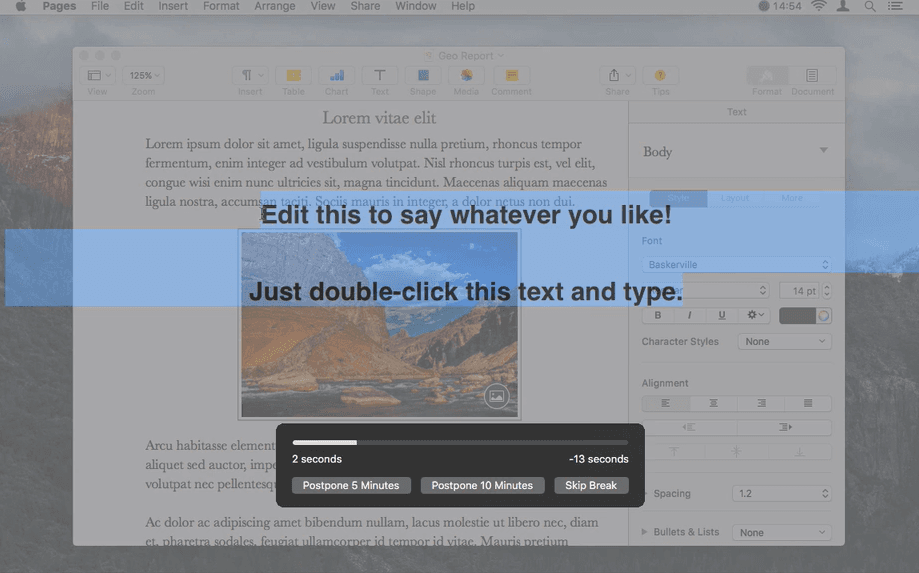
Time Out website snapshot for reference.
Feature-by-feature comparison
Short version of CapyBreaks and Time Out. These details are from Time Out's site on 5 October 2026. The next section says what is the same and what is not.
Platform support
CapyBreaks
Mac, WindowsTime Out
Mac onlyPricing model
CapyBreaks
$14.99 once for up to 3 devices, with a 7-day trial. Team is $9.99 per seat.Time Out
Free, with optional supporter purchasesBreak types
CapyBreaks
Eyes, hydration, stretching, posture, with CappyTime Out
Normal, Micro, and custom break kindsIdle handling
CapyBreaks
Skips a due reminder after 5 minutes idle and starts the timers overTime Out
Breaks can count down during a natural break when you step awayWorking hours
CapyBreaks
Working hoursTime Out
Breaks can be limited to certain hoursBreak screen
CapyBreaks
Optional lock screenTime Out
Screen dims and a break theme appearsThemes and actions
CapyBreaks
CappyTime Out
Themes, plus AppleScript and Automator actionsActivity tracking
CapyBreaks
No activity chartTime Out
Optional tracking of breaks and app usageWhat is the same, and what is not
What is the same
Both are break reminders with working hours and idle handling. Time Out can limit breaks to certain hours, and its breaks can count down during a natural break when you step away from the computer. CapyBreaks has working hours. Its default idle detection skips a due reminder after 5 minutes without keyboard or mouse and starts the timers over. Time Out has lock-style breaks too: when a break starts, the screen slowly dims and a break theme appears. CapyBreaks has an optional lock screen.
What is different
Time Out is Mac only. The current download on its site requires macOS 26.0 or later, and it also offers version 2.9.7 for macOS 10.15 or later. It is free to download, with optional supporter purchases for advanced features. It comes with a Normal break, typically 10 minutes every hour, and a Micro break, typically 15 seconds every 15 minutes. You can change, disable, or remove those, and add other break kinds. It has themes, actions before, during, and after a break, including AppleScript and Automator, and optional activity tracking. CapyBreaks is the premium product for Windows and Mac. Personal is $14.99 once for up to 3 devices, with a 7-day trial. Team is $9.99 per seat. Windows installs from the Microsoft Store. The Mac download is an Apple-silicon DMG. It reminds you about eyes, hydration, stretching, and posture, with Cappy. A reminder that comes due while the microphone is in use, or while a fullscreen app is active, is skipped and the timers start over. On Windows, reminders also pause when Windows reports presentation mode. On Mac, a presentation in a window that does not fill the screen does not by itself pause reminders. Default idle detection skips a due reminder after 5 minutes without keyboard or mouse and starts the timers over. A screen share by itself does not pause reminders.
CapyBreaks is the premium option next to Time Out
Time Out is a Mac break reminder. It is free to download, and it has lock-style breaks, working hours, and natural breaks. CapyBreaks is the premium break reminder for Windows and Mac.
Personal is $14.99 once for up to 3 devices, with a 7-day trial. Team is $9.99 per seat. Windows installs from the Microsoft Store. The Mac download is an Apple-silicon DMG.
Where Time Out still does well
- Mac app with a Normal break and a Micro break, and you can add other break kinds.
- Breaks can count down during a natural break when you step away from the computer.
- Themes, actions before, during, and after a break, including AppleScript and Automator, and optional activity tracking.
- Lock-style breaks: when a break starts, the screen slowly dims and a break theme appears.
Windows and Mac
Time Out is Mac only. CapyBreaks runs on Windows and Mac.
The premium license
CapyBreaks is the paid break reminder. Personal is $14.99 once for up to 3 devices, with a 7-day trial. Team is $9.99 per seat. Windows installs from the Microsoft Store. The Mac download is an Apple-silicon DMG.
Cappy and four reminders
CapyBreaks reminds you about your eyes, hydration, stretching, and posture, with Cappy. Time Out uses Normal and Micro breaks, and you can add other kinds.
Time Out keeps its own tools
Time Out has themes, before, during, and after actions including AppleScript and Automator, and optional activity tracking. Those are Time Out features.
CapyBreaks is the premium break reminder.
It runs on Windows and Mac, reminds you about your eyes, water, stretching, and posture, and Personal is $14.99 once for up to 3 devices. There is a 7-day trial. Team is $9.99 per seat. Windows installs from the Microsoft Store. The Mac download is an Apple-silicon DMG.